
The main goal of CMake is to describe how your project should be built in terms of targets:
- source files,
- dependencies,
- include directories,
- compile definitions,
- compiler options,
- linker options,
- and other build properties.
CMake provides enough tools to describe this clearly without adding unnecessary custom logic.
Ignoring those tools — or using them in the wrong way — is what often makes a build configuration fragile.
In this article, I’ll explain the most common mistakes I see in CMake configuration files and how to avoid them.
Cramming everything into a single CMakeLists.txt
“Let’s just make the code build somehow and focus on features instead.”
I’ve heard this more than once. And it often turns into a single root CMakeLists.txt file responsible for everything:
- global project setup,
- declaring all targets,
- configuring dependencies,
- setting compiler options,
- enabling tests,
- and handling project-specific build logic.
At first, this may look convenient. There is only one file, and everything is in one place.
But as the project grows, this file quickly becomes messy and hard to read. Every new library, executable, test target, dependency, or build option adds more logic to the same file. Eventually, changing one target requires scrolling through unrelated configuration for the whole project.
A better approach is to split the build configuration according to the project structure.
Each module should live in its own directory and have its own CMakeLists.txt. The root configuration then includes these modules with add_subdirectory().
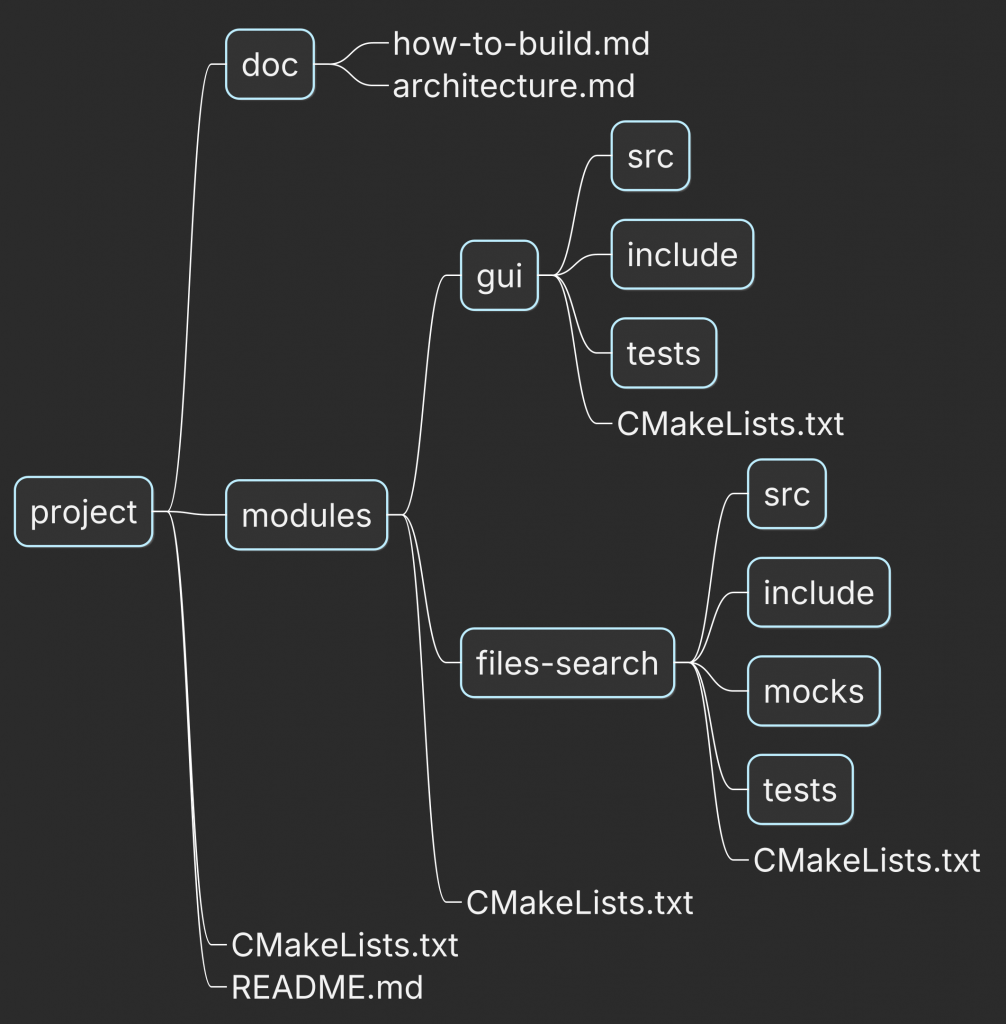
Where Root CMakeLists.txt:
cmake_minimum_required(VERSION 3.25)
project(my_project LANGUAGES CXX)

enable_testing()

add_subdirectory(modules)
And the CMakeLists.txt from modules/files-search/src defines the library itself:
# Add library wtih  the core library responsible for searching process
add_library(files-search STATIC
  impl/interfaces/DirectoryWalker.h
  impl/interfaces/MatchSeeker.h

  impl/DirectoryWalkerImpl.h
  impl/DirectoryWalkerImpl.cpp
  impl/MatchSeekerImpl.h
  impl/MatchSeekerImpl.cpp
  impl/SearcherImpl.h
  impl/SearcherImpl.cpp

  impl/Factory.cpp
)

target_sources(files-search
  PUBLIC
   FILE_SET HEADERS
   BASE_DIRS
     include
   FILES
     include/files-search/Searcher.h
     include/files-search/MatchesCollector.h
     include/files-search/Factory.h
)

# Add include folder with implementations into as internal for the library
target_include_directories(files-search PRIVATE "${CMAKE_CURRENT_SOURCE_DIR}")
With this structure:
- the root
CMakeLists.txtis responsible for high-level project setup: - project name,
- global options,
- language standard,
- common policies,
- enabling testing,
- adding project modules;
- each module-specific
CMakeLists.txtis responsible for its own targets: - libraries and executables,
- source files,
- dependencies,
- include directories,
- compile definitions,
- compile/link options,
- tests for that module.
This makes the build configuration easier to navigate and maintain.
Need to change project-wide setup?
Go to the root CMakeLists.txt.
Need to modify a specific target?
Go to that module’s CMakeLists.txt.
The general rule is simple:
CMake structure should follow the project structure.
If the source code is split into modules, the build configuration should be split into modules as well.
Ignoring CTest infrastructure for tests
Tests are often treated as a secondary part of the project: as long as they exist somewhere, everyone pretends the project is tested. A charming little illusion, until nobody can reliably run them.
For tests to be truly useful, they must be easy to run locally and in CI.
CMake already provides the right tool for this: CTest.
CTest allows you to:
- run all tests with a single command,
- include or exclude tests by regular expression,
- run tests in parallel,
- group tests with labels,
- set timeouts, working directories, and environment variables,
- integrate test execution into CI,
- and generate test reports depending on your CMake/CI setup.
Before registering tests, enable testing in your project:
enable_testing()
or:
include(CTest)
Instead of manually running a test binary, register it with CTest using add_test():
add_executable(my-test-executable
    ...
)

add_test(NAME TestMyLib
         COMMAND my-test-executable)
This creates a CTest test named TestMyLib. When this test is executed, CTest runs the my-test-executable binary.
If the executable returns a non-zero exit code, CTest marks the test as failed and includes it in the final test report.
This approach already gives you a stable CI command:
ctest --parallel --output-on-failure
However, when using GoogleTest, there is a better option: gtest_discover_tests().
include(GoogleTest)

gtest_discover_tests(my-test-executable)
Unlike a single add_test() call for the whole executable, gtest_discover_tests() discovers individual GoogleTest test cases and registers them as separate CTest tests.
That gives you several advantages:
- individual test cases can be selected by name,
- tests can be filtered with
ctest -Rorctest -E, - failures are easier to identify,
- and CTest can schedule them independently.
For example:
ctest -R SearcherTest --output-on-failure
or:
ctest --parallel --output-on-failure
The important part is that your CI command does not need to change when you add new test cases or new test executables. Once tests are registered with CTest, they become part of the project’s test infrastructure.
If GoogleTest itself is not yet part of your project, I cover the practical setup — from the first test target to fixtures and mocks — in How to Introduce Unit Tests in Your Project.
The general rule is simple:
Do not hide tests behind manual commands. Register them with CTest and let the build system know they exist.
Inventing additional build logic
“If the option ADD_SOME_COMPILE_FLAG is enabled, add this compiler flag to the build.”
Sounds familiar?
This is a common pattern in CMake projects, especially for things like sanitizers and test coverage. At first, it looks reasonable:
- add one option to enable UndefinedBehaviorSanitizer,
- add another option to enable coverage,
- maybe add one more for a different CI check.
And then the configuration slowly becomes a collection of custom switches that must be combined in the right way. Very elegant, assuming your build system enjoys riddles.
Static analysis is another check that benefits from being part of the build rather than a separate manual step. I cover the CMake integration in Why clang-tidy Matters in Real C++ Projects.
In practice, these options are often used together for a specific CI build, for example as part of a quality gate. I usually need such configurations in two cases:
- when introducing them for debugging,
- when a CI build fails and I need to investigate the reason locally.
If several flags are always used together, it often makes sense to group them into a dedicated build configuration instead of inventing additional project-specific options.
For single-config generators such as Makefiles or Ninja, this can be done by defining a custom build type.
To introduce a new build configuration, define the corresponding CMake variables:
CMAKE_CXX_FLAGS_<CONFIG>CMAKE_EXE_LINKER_FLAGS_<CONFIG>CMAKE_SHARED_LINKER_FLAGS_<CONFIG>
For example, a configuration that enables UndefinedBehaviorSanitizer and coverage could be called QualityCheck:
set(QUALITY_CHECK_FLAGS "-fsanitize=undefined --coverage -O0 -g")

set(CMAKE_CXX_FLAGS_QUALITYCHECK
    "${QUALITY_CHECK_FLAGS}"
    CACHE STRING "C++ compiler flags for the QualityAnalysis build."
    FORCE
)

set(CMAKE_EXE_LINKER_FLAGS_QUALITYCHECK
    "${QUALITY_CHECK_FLAGS}"
    CACHE STRING "Executable linker flags for the QualityAnalysis build."
    FORCE
)

set(CMAKE_SHARED_LINKER_FLAGS_QUALITYCHECK
    "${QUALITY_CHECK_FLAGS}"
    CACHE STRING "Shared library linker flags for the QualityAnalysis build."
    FORCE
)

mark_as_advanced(
    CMAKE_CXX_FLAGS_QUALITYCHECK
    CMAKE_EXE_LINKER_FLAGS_QUALITYCHECK
    CMAKE_SHARED_LINKER_FLAGS_QUALITYCHECK
)
Then configure the project with:
cmake -DCMAKE_BUILD_TYPE=QualityCheck ..
Now CMake applies all compiler and linker flags associated with that build type automatically. You do not need to manually combine several custom options every time you want this specific CI/debug configuration.
This keeps the configuration clearer:
Debugis for debugging,Releaseis for optimized builds,RelWithDebInfois for optimized builds with debug symbols,QualityCheckis for sanitizer/coverage checks.
The general rule is simple:
If a set of flags represents a repeatable build mode, model it as a build configuration instead of spreading it across multiple custom options.
Managing compilation flags manually
Do you still specify the C++ standard, warnings-as-errors, or optimization flags manually through raw compiler flags?
CMake often provides a cleaner and more reliable way to express these requirements.
For example, CMAKE_COMPILE_WARNING_AS_ERROR enables treating compiler warnings as errors for targets created after this variable is set.
CMAKE_CXX_STANDARD defines the C++ standard version, while CMAKE_CXX_STANDARD_REQUIRED forces configuration to fail if the compiler does not support the requested standard.
CMAKE_INTERPROCEDURAL_OPTIMIZATION enables interprocedural optimization (IPO / LTO), but in real projects it is usually better to check compiler support first with CheckIPOSupported.
However, sometimes developers manually change compiler flags depending on the build type:
if(CMAKE_BUILD_TYPE STREQUAL "Debug")
  set(CMAKE_CXX_FLAGS "-O0 -g3 -fno-omit-frame-pointer")
else()
  set(CMAKE_CXX_FLAGS "-O3 -ffast-math")
endif()
It may work in a simple setup.
But it is fragile:
- it depends on
CMAKE_BUILD_TYPE, - it does not handle multi-config generators well,
- it modifies global compiler flags,
- it can overwrite flags added by the toolchain or dependencies,
- it becomes harder to maintain as the project grows.
CMake already has configuration-specific mechanisms, for example:
CMAKE_CXX_FLAGS_DEBUGCMAKE_CXX_FLAGS_RELEASECMAKE_CXX_FLAGS_RELWITHDEBINFO
So a better version would be:
set(CMAKE_CXX_FLAGS_DEBUG "-O0 -g3 -fno-omit-frame-pointer")
set(CMAKE_CXX_FLAGS_RELEASE "-O3")
set(CMAKE_CXX_FLAGS_RELWITHDEBINFO "-O2 -g")
This is already cleaner than manual if/else logic.
But for modern target-based CMake, prefer target-specific settings when possible and the next section describes how to do it properly.
Misusing global CMake commands
CMake provides several directory-level commands, such as:
add_compile_options()include_directories()link_libraries()
They apply settings broadly to the current directory and, in many cases, to targets created in subdirectories as well.
This makes the build configuration harder to reason about.
The problem is that implementation details of one target — include directories, compiler options, or linked libraries — can accidentally become visible to unrelated targets.
That pollutes the project structure and erodes architecture boundaries.
Typical consequences are:
- stronger coupling between targets,
- accidental use of implementation headers from another library,
- header name collisions between unrelated modules,
- unexpected symbols or libraries being used during linking,
- configuration that becomes harder to debug as the project grows.
That is why modern CMake encourages a target-centric approach.
A target should describe:
- which source files it builds,
- which include directories it needs,
- which compile options it uses,
- which libraries it links to,
- and which of those requirements are part of its public API.
For target-specific configuration, prefer:
target_compile_options()target_include_directories()target_link_libraries()
These commands take visibility keywords:
PRIVATEPUBLICINTERFACE
Use PRIVATE when something is needed only to build the target itself.
Use PUBLIC when something is needed both to build the target and to compile targets that link against it.
Use INTERFACE when the current target does not need the requirement itself, but its users do.
For example:
add_library(files-search STATIC
  impl/DirectoryWalkerImpl.h
  impl/DirectoryWalkerImpl.cpp
  impl/MatchSeekerImpl.h
  impl/MatchSeekerImpl.cpp
  impl/SearcherImpl.h
  impl/SearcherImpl.cpp
  impl/Factory.cpp
)

# Internal headers used only while building files-search.
target_include_directories(files-search
  PRIVATE
    "${CMAKE_CURRENT_SOURCE_DIR}"
)

# Public headers exposed as part of the library API.
target_include_directories(files-search
  PUBLIC
    "${CMAKE_CURRENT_SOURCE_DIR}/include"
)
Now the boundary is explicit:
- implementation headers stay private,
- public headers are exported to users of the library,
- unrelated targets do not accidentally inherit internal include paths.
The general rule is simple:
Do not configure the whole directory when you only mean to configure one target.
Want to Make Target-Based CMake Click?
Most fragile CMake configurations have the same underlying problem: the relationships between targets are implicit, global, or scattered across the project.
Once you understand targets and usage requirements, much of modern CMake becomes easier to reason about.
I put together a free practical guide that explains that model:
👉 Modern CMake Becomes Simple Once You Understand How Targets Work
It covers clean target-based configuration, dependencies, include paths, and PUBLIC, PRIVATE, and INTERFACE with practical examples.
Conclusion
CMake configuration becomes fragile when it stops describing the project structure clearly.
A single overloaded CMakeLists.txt, manually managed compiler flags, ignored CTest infrastructure, unnecessary custom logic, and global CMake commands all lead to the same problem: the build configuration becomes harder to understand, harder to extend, and easier to break.
Modern CMake works best when the configuration follows the project structure:
- targets describe their own sources, dependencies, include paths, and build requirements,
- tests are registered with CTest and become part of the build infrastructure,
- build modes are expressed explicitly instead of being scattered across custom options,
- public and private requirements stay separated.
The general rule is simple:
Use CMake’s model instead of building your own fragile one.
That is how the build configuration becomes easier to maintain as the project grows.
See What This Looks Like in a Real C++ Project
Avoiding fragile CMake is not really about memorizing a better set of commands.
It is about making the build system reflect the structure of the application: libraries have clear boundaries, dependencies are explicit, tests are first-class targets, and each module owns its build requirements.
That is exactly how I approach CMake in No More Helloworlds — Build a Real C++ App.
Instead of looking at CMake in isolation, the book builds a complete application and shows how project structure, CMake targets, libraries, executables, tests, architecture, and CI fit together.
If you understand individual CMake commands but still wonder how to structure the build system of a real C++ application, this is the next step.